

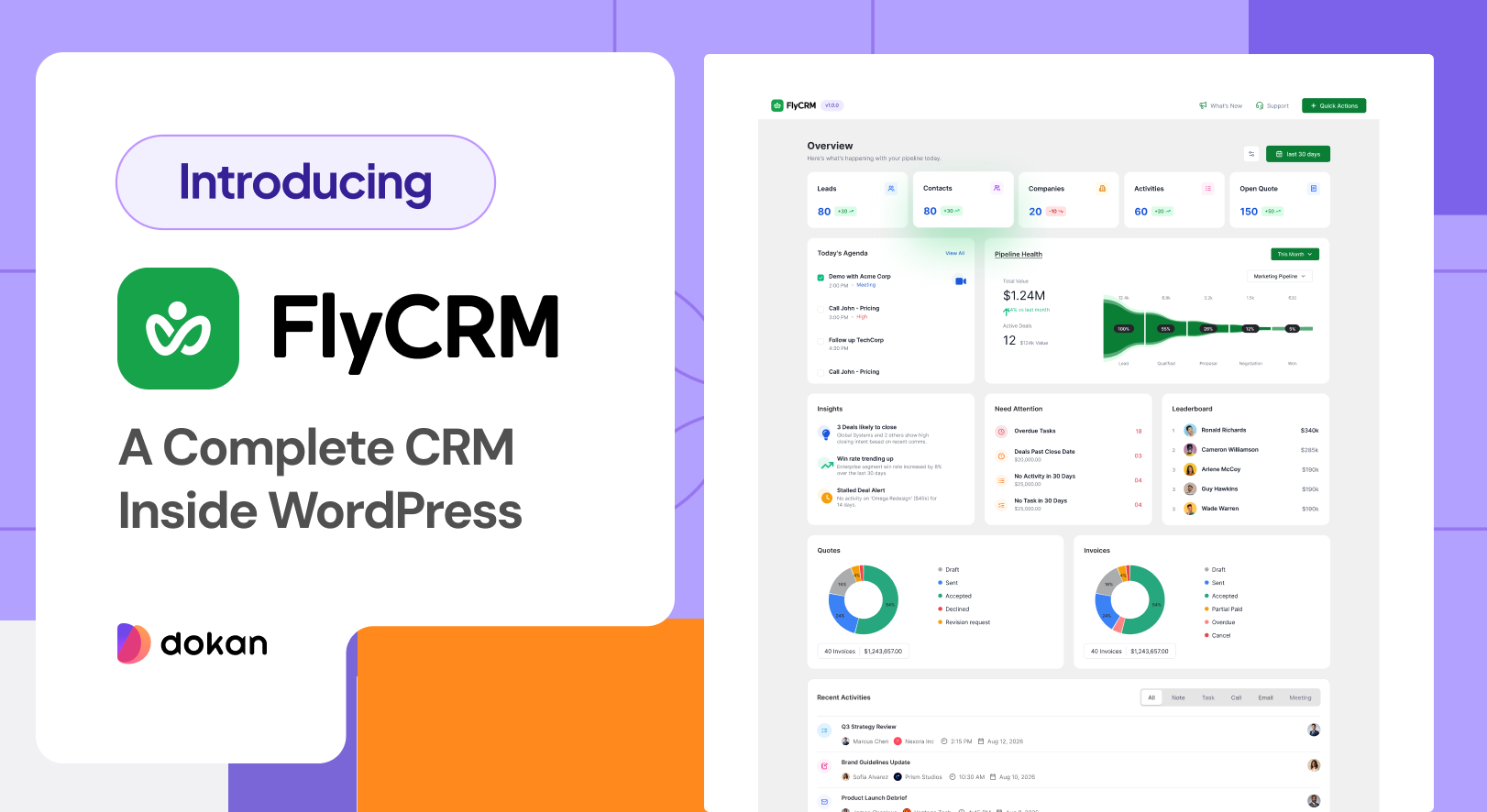
weDevs launched FlyCRM on 14 September 2026. The plugin is free on WordPress.org, with FlyCRM Pro on top for the teams that need invoices, payments and automation. It is a CRM that installs into WordPress, so your contacts, companies, leads, deals and quotes stay in the database your marketplace already runs on. Dokan keeps the selling side straight. FlyCRM is for the people behind it, the sellers you are still trying to sign and the buyers who came back three times. Here is what it does and what it costs.
What Is FlyCRM
FlyCRM is a sales CRM, and it opens inside the same WordPress admin your marketplace already uses. A person gets a profile holding their email, phone numbers, job title, social links and addresses. A business gets one too, with its industry, employee count, revenue, website, logo and the people who work there.
Nothing travels to an outside service. There is no separate account to open, no monthly fee and no ceiling on how many records you keep, because the whole thing runs on your own hosting.
The people who built WP ERP built this one, though FlyCRM is a separate plugin rather than an upgrade of WP ERP CRM, and none of that data comes with it. It comes from the same weDevs team that builds Dokan.
[Image here: FlyCRM dashboard inside the WordPress admin, pipeline value by stage and period comparison]
Why a Marketplace Needs a CRM
A marketplace is mostly relationships. Sellers to recruit, sellers halfway through onboarding, buyers worth keeping, and a few conversations that turn into money if somebody follows them up.
Dokan is precise about the money. Orders, commission and payouts are all accounted for. What it does not hold is the talk around a store, the email asking whether you take bulk listings, the six weeks since anyone spoke to your third largest seller.
So that half ends up in a mailbox, a phone and a spreadsheet somebody renames every few weeks. It holds while you are small. Past fifty stores it stops, because the person who took the call is not the one answering the follow up, and vendor relationships run on memory.
A CRM is where that half goes instead. One record per store and per buyer, one owner for it, and a history anyone on your team can read before replying.
What FlyCRM Does
All of this is in the free plugin.
Contacts and Companies
Every store owner, buyer and supplier on your books gets a record with a timeline, where notes, logged calls, sent emails, meetings, tasks and attached files stack up in order. Each record also shows the date of the last contact and what kind it was, so it is obvious who has been left alone.
Contacts, companies and leads each get their own set of color coded statuses, while one tag list runs across all three. Every record has an owner, and anything deleted by mistake waits in the trash.
Leads and Lead Scoring
Leads sit in a list of their own, so the sellers who ask about joining and then disappear never mix in with the stores you work with. You score a lead yourself, a number you choose rather than one a rule engine hands you.
Lead source tracking notes the campaign, medium, source, content and term a lead arrived on, and the page that referred it, so a directory applicant is easy to tell from one who clicked an ad. Seven lead statuses are ready on day one, running from New and Contacted through to Qualified and Converted. When a lead turns real, one step creates the contact, the company and the deal together, history included.
The Deal Board
Deals live on a kanban board and you move them by dragging. Each stage carries a running total, so you can see what Negotiation is worth without exporting anything.
Run one pipeline for each way you sell, because signing a store and closing a wholesale buyer are not the same sequence. Stages reorder by dragging, every stage takes a win probability, and a usable pipeline is there the moment you switch the plugin on. Every deal keeps a value, an expected close date and as many contacts as the sale needs, each with a role, for when one person signs and another does the listing.
[Image here: FlyCRM kanban deal board with drag and drop stages and a total per stage]
Quotes Clients Accept Online
Put line items, a discount and tax into a quote, and it takes a document number from your own prefix and goes out as a PDF you email from the CRM. Each one also gets a web page, so your seller reads it with no WordPress login and clicks accept or decline, and the status on your side follows. Opens are tracked, so you know whether it was read. Quotes are free. Invoices and payment tracking belong to FlyCRM Pro.
FlyCRM and Dokan
The Dokan integration lands with this launch, and it takes two jobs off your desk.
The first is tagging. Anyone who signs up as a vendor is marked as one at that moment, and buyers are left as buyers, so a single filter gives you your sellers and nothing else.
The second is the company record. Each new vendor lands in FlyCRM as a company under its store name, so the contacts, deals, notes and tasks belonging to that store have somewhere to sit from day one.
Buyers arrive through WooCommerce. Order sync turns an order into a contact, and you pick which order statuses set that off. The contact then shows what that buyer has spent, over how many orders, with the average and the last order date. A one time import covers people who bought earlier.
Commission, payouts and product approval carry on in Dokan. FlyCRM keeps the relationship around them, and our guide to managing vendors on a marketplace covers the routine.
What FlyCRM Is Not
The CRM covers sales work and leaves everything else alone. There is no email marketing inside, no campaigns and no broadcasts, so whatever sends your seller newsletter keeps that job. FlyCRM sends a quote with its PDF and records one to one mail through your own server.
There is no accounting in it and no HR, and nothing writes your emails or summarizes a call for you. What sits on a record is what you put there.
It is also not a new version of WP ERP CRM. FlyCRM was built again from scratch as a separate plugin, and nothing moves between the two when you install it. Records you already hold move over with the free CSV import, which maps your columns and spots duplicate email addresses.
What Is Free and What FlyCRM Pro Adds
Everything above is in the free plugin, and so is the dashboard, which sets open quotes, new contacts, revenue, activity volume and average sales cycle against the period before and breaks pipeline value down by stage. Both CRM roles are free too, so a CRM Manager reaches everything while a CRM Agent sees only the records they own.
FlyCRM Pro is the paid side. Pro brings invoices with payment tracking and partial payments, turns an accepted quote straight into an invoice, and takes payment through Stripe and PayPal. It adds custom fields, workflow automation, a product catalog, email templates, sales reports, team invites, CSV import for leads and inbox sync, so a client reply lands back on the record. The features page sets both halves side by side, and the launch post covers what shipped.
Launch Offer and Pricing
Every lifetime license is 50% off to mark the launch.
- Starter runs one site, down from $249 to $125
- Business runs five sites, down from $399 to $199
- Agency runs fifty sites, down from $699 to $349
You pay once, nothing renews, updates and priority support come with it, and there are 14 days to get your money back. Yearly plans sit alongside at $99, $199 and $349, though the discount applies to lifetime licenses only. Unlimited users and unlimited contacts come with every plan, and the license counts sites rather than people, so putting your whole marketplace team in the CRM does not move the bill. Current numbers always sit on the pricing page.
[Image here: FlyCRM launch offer, 50 percent off lifetime licenses]
How to Install FlyCRM
In your WordPress dashboard, open Plugins, then Add New, and type FlyCRM into the search box. Install Now, then Activate. The plugin needs WordPress 6.5 or newer and PHP 7.4 or newer, and the zip sits on WordPress.org if you prefer to upload it.
Activation handles the setup, with one pipeline, a starter tag list and statuses for contacts, companies and leads already in place. Open the FlyCRM menu and add your first store owner, or go to Import and bring in the seller list you already keep.
Lead capture from Contact Form 7, WPForms, Fluent Forms, Ninja Forms and Gravity Forms sits under FlyCRM, then Integrations, where each form gets a feed of its own. Point your seller application at it and applicants arrive as leads, and there is a guide to onboarding vendors if you want help with that form.
Frequently Asked Questions
Does Dokan have a CRM?
Not on its own. Dokan is marketplace software, so it handles stores, products, orders, commission and payouts, and stops where the relationship starts. FlyCRM fills that gap for free in the same admin, and its Dokan integration lands with this launch, tagging each vendor at signup.
Are vendors and buyers kept separate in FlyCRM?
Yes. The integration marks each seller as a vendor at signup, so filtering on that tag returns your stores and nothing else. Buyers arrive separately as contacts through WooCommerce order sync, and applicants who never joined stay out of both, because leads are their own record type.
Does FlyCRM sync WooCommerce orders from my marketplace?
It does. Order sync writes a contact from an order, and you pick the order statuses that trigger it, so cancelled and failed orders stay out. The contact shows what that buyer has spent, over how many orders, with the average and the last order date.
Can a CRM work as vendor management software?
Up to a point. Finding, signing and keeping a seller has the same shape as a sales process, so a pipeline with your own stages and a company record per store fits it. Calculating commission and running a payout are not CRM jobs and stay in Dokan.
Is there a limit on how many contacts or companies I can keep?
No. There is no record cap on any plan, and what you hold has no effect on the price, which for the free plugin is nothing. Three hundred stores and eight thousand buyers is a small database, and your hosting sets the real ceiling.
Put Your First Seller on the Board
Install the plugin and pick one store, ideally the seller you keep meaning to call. Give them a company record, write down what you last agreed, and put a deal on the board with a number on it and a date you would defend.
Do that for your five quietest stores and the board starts telling you things your reports never do. One is waiting on an answer from you. One has already gone and nobody noticed.
Dokan keeps the marketplace running. FlyCRM keeps the people behind it, on your own server, in the admin you already open every day. The plugin costs nothing on WordPress.org, and the pricing page has the lifetime offer while the launch discount lasts.


Leave a Reply