



Payments are the one part of your marketplace that has to work every single time. When checkout feels slow, clunky, or limited, customers leave, and your vendors lose sales they should have won.
That is why we have rebuilt how Dokan Stripe Connect handles payments. With the upcoming release, the module will now run on Stripe Elements, which brings a modern checkout, a much wider range of payment methods, and full support for WooCommerce block checkout.
Here is what is new, why we made the change, and exactly what you need to do before you update.
Quick summary. Dokan Stripe Connect now supports Stripe Elements, unlocking more payment methods including Google Pay and Apple Pay, plus block checkout support. If you have customized the Stripe Connect module, test on staging before you update.
What Is New in Dokan Stripe Connect
This release focuses on three changes, and each one solves a real problem your marketplace has been living with.
1. Stripe Elements
Dokan Stripe Connect now uses Stripe Payment Elements, the modern payment interface Stripe builds and maintains. Instead of a basic card form that only accepts a card number, expiry date, and CVC, your customers now get a checkout that adapts to them.
Stripe keeps Elements updated on their side, so your marketplace stays current with new payment standards without you touching a line of code. Strong Customer Authentication is always on with Payment Elements, which means the security step that European regulations require is handled for you.
2. Access to Many More Payment Methods
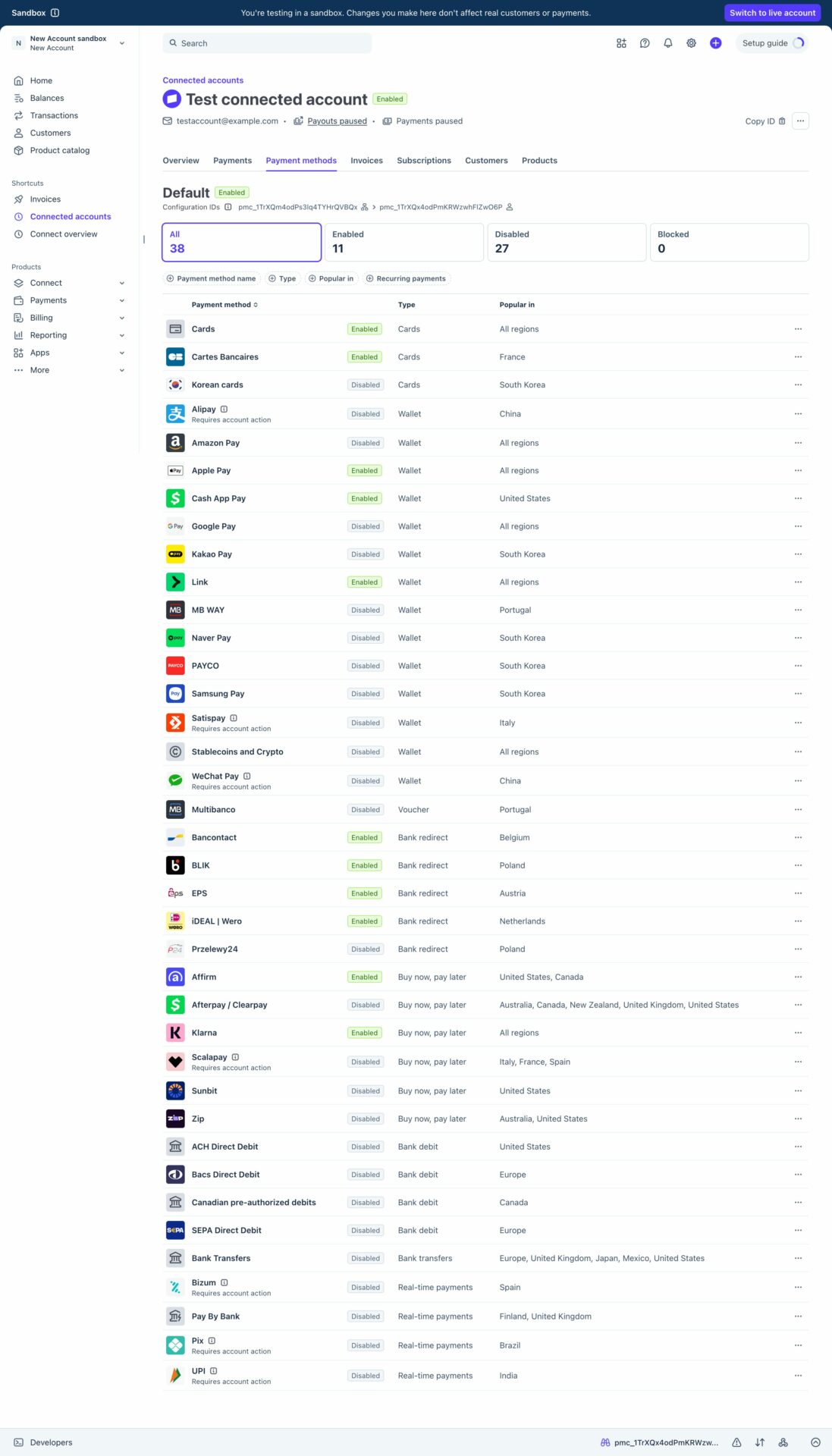
This is the change your vendors will feel most. With Elements in place, your checkout is no longer limited to plain card payments.
Customers can now pay with the methods they already trust and have set up, including Google Pay and Apple Pay. Wallet payments let a shopper complete a purchase with a fingerprint or a face scan, with no card typing at all.
Fewer fields to fill in means fewer abandoned carts. That matters most on mobile, where typing a card number is exactly the moment many shoppers give up.
3. Block Checkout Support
WooCommerce has been moving toward block-based checkout, and Dokan Stripe Connect now works with it properly.
If your marketplace uses the block checkout, Stripe payments now appear and function the way they should, with no workarounds and no falling back to the classic checkout just to take a payment. Your store can use modern WooCommerce and modern Stripe together.
Why We Made This Change
We did not rebuild this for the sake of new features. We did it because the old approach was starting to hold marketplaces back.
The previous card form worked, but it only did one thing. It accepted a card. Meanwhile, shoppers moved on. They pay with wallets, they expect one-tap checkout on their phones, and they abandon carts that ask them to dig out a physical card.
At the same time, WooCommerce kept evolving toward blocks, and payment security rules kept tightening. Staying on the old integration meant slowly drifting away from both.
Moving to Stripe Elements solves all of it at once.
- Higher conversion. More payment options and a faster checkout mean fewer people drop out at the last step.
- Better mobile experience. Wallet payments turn a two-minute form into a two-second confirmation.
- Security handled for you. Strong Customer Authentication is built in, so European compliance is not something you have to maintain.
- Future-ready. Stripe adds new payment methods to Elements over time, and your marketplace inherits them.
- Modern WooCommerce support. Block checkout now works out of the box.
Your vendors get paid the same way they always have. Dokan Stripe Connect is still an adaptive payment gateway, so the admin commission and the vendor earnings still split automatically the moment an order is placed. That part has not changed. What changed is how many customers can actually reach that point.
What You Need to Do Before Updating
For most marketplaces, this update is straightforward. But there is one important warning, and we want to be direct about it.
Important. If you have any customization on the Stripe Connect module, it may break with this release. Test the update on a staging site first, and talk to the developers who customized your site before you go live.
That warning matters. Because the payment interface has been rebuilt, custom code that hooked into the old card form may no longer behave the way it did. Better to find that on staging than on your live checkout.
Here is the safe path to follow.
- Check whether your Stripe Connect module is customized. If a developer has modified how your payments or checkout behave, treat this as a customized setup.
- Update on staging first. Clone your site, apply the update there, and run a full test purchase from cart to completed order.
- Test the payment methods you care about. Run a card payment, then try Google Pay and Apple Pay if your customers use them.
- Test on block checkout if you use it. Confirm Stripe appears correctly and the order completes.
- Talk to your developers. If anything looks off, the people who customized your site are the fastest route to a fix.
- Then update live. Once staging is clean, roll it out with confidence.
If your marketplace runs a standard Dokan Stripe Connect setup with no custom code, you can update as normal.
What Changed in Your Settings
One setting is worth calling out, because its behavior is now different.
The 3D Secure and SCA toggle in your Stripe settings no longer affects new checkouts. Strong Customer Authentication is always on with Stripe Payment Elements, so the toggle stays only for legacy orders. You do not need to turn anything on to stay compliant. It is simply handled.
Everything else in your admin settings works as before, including your options for non-connected sellers, connection notices, and who pays the Stripe processing fee.
Saved cards will not carry over, so customers will need to save their card again or add a new one at their next checkout.
What Your Vendors and Customers Will Notice
Your vendors do not need to do anything new. They connect their Stripe account from the vendor dashboard exactly as they always have, under Settings and then Payment, using the Connect with Stripe button. Their payouts and commission splits work the same way.
Your customers will notice the difference immediately. At checkout, instead of a single card form, they see the payment methods available to them, including wallets. On a phone with Apple Pay or Google Pay set up, they can pay in seconds without typing anything.
That is the whole point of this release. Same reliable payouts for your vendors, a far better checkout for the people buying from them.
Frequently Asked Questions
Do I have to do anything to enable Stripe Elements?
No. Once you update Dokan Stripe Connect, Elements is in place. Your existing Stripe keys, webhook, and Client ID keep working, so there is nothing to reconnect.
Will this break my site?
For a standard setup, no. But if your Stripe Connect module has been customized, the update may break that customization. Test on staging first and check with the developers who made those changes.
Which payment methods can my customers use now?
Stripe Elements opens up a much wider set of payment methods than the old card form, including Google Pay and Apple Pay alongside standard card payments. The exact options a customer sees depend on their device, location, and your Stripe account settings.
Does this change how my vendors get paid?
No. Dokan Stripe Connect is still an adaptive gateway. The admin commission and vendor earnings split automatically when an order is placed, and everything is still recorded in your Dokan Reports.
Do I still need to enable 3D Secure?
No. Strong Customer Authentication is always on with Stripe Payment Elements. The 3D Secure and SCA toggle remains only for legacy orders and has no effect on new checkouts.
Does this work with WooCommerce block checkout?
Yes. Block checkout support is one of the main additions in this release, so Stripe payments now work properly on modern WooCommerce checkouts.
Update and Give Your Customers a Better Checkout
Payments are where a marketplace either closes the sale or loses it. With Stripe Elements, more payment methods, and block checkout support, Dokan Stripe Connect now gives your customers a checkout that matches how they actually want to pay.
If your setup is standard, update and enjoy it. If your Stripe Connect module has been customized, take the extra hour to test on staging and speak to your developers first. That one step protects your live checkout.
Subscribe to
Dokan blog
We send weekly newsletters, no spam for sure!



Leave a Reply