
wePOS works smoothly with Dokan. It allows each vendor to run their own POS system inside a shared marketplace. Vendors can manage in-store sales, handle orders, and track activity without affecting other vendors.
With Dokan, each vendor has control over their own store. The Access settings in wePOS extend that control further. You can decide what a vendor can access and manage inside the POS system. This helps maintain clear boundaries and keeps operations organized.
Below are the available access controls for Vendors:
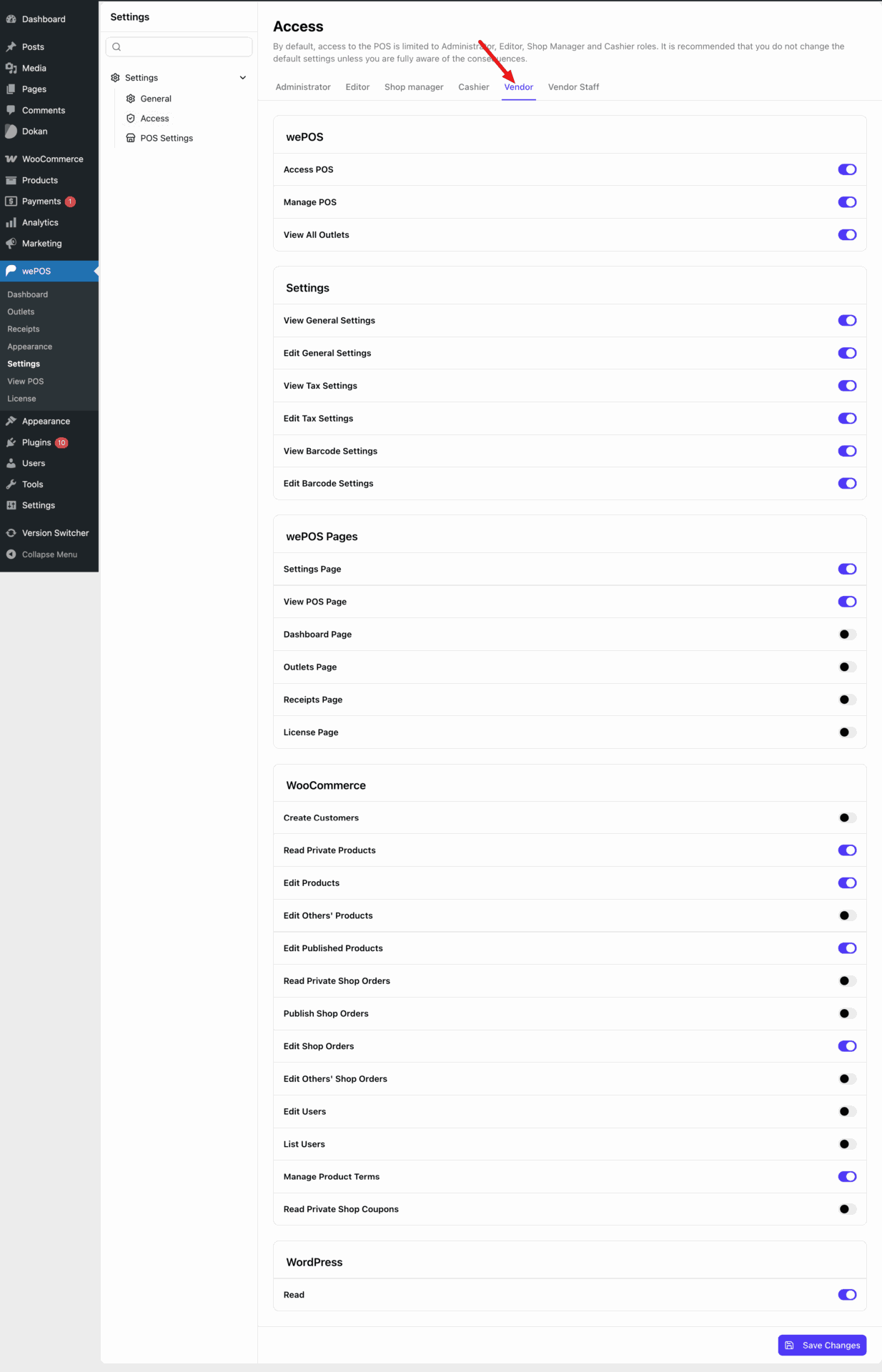
Access POS: Allows the user to open and use the POS interface.
Manage POS: Gives control over POS operations for their own store.
View All Outlets: Lets the user view available outlets.
View General Settings: Allows viewing general POS settings.
Edit General Settings: Allows modifying general POS settings.
View Tax Settings: Grants permission to view tax configurations.
Edit Tax Settings: Allows editing tax configurations.
View Barcode Settings: Allows viewing barcode settings.
Edit Barcode Settings: Allows modifying barcode settings.
Settings Page: Grants access to the settings section of wePOS.
View POS Page: Allows access to the POS interface page.
Dashboard Page: Grants access to the wePOS dashboard.
Outlets Page: Allows access to manage outlets.
Receipts Page: Grants access to receipt management.
License Page: Allows access to license settings.
Create Customers: Allows creating new customers from POS.
Read Private Products: Grants access to view private products.
Edit Products: Allows editing their own products.
Edit Others’ Products: Allows editing products created by other users.
Edit Published Products: Allows editing published products.
Read Private Shop Orders: Allows viewing private orders.
Publish Shop Orders: Allows creating and publishing orders.
Edit Shop Orders: Allows editing their own orders.
Edit Others’ Shop Orders: Allows editing orders created by other users.
Edit Users: Allows modifying user accounts.
List Users: Allows viewing users.
Manage Product Terms: Allows managing categories, tags, and attributes.
Read Private Shop Coupons: Allows viewing private coupons.
Read: Basic WordPress permission to access the dashboard.