
You can manage the access of the users of the wePOS system. You can manage-
- Admin
- Editor
- Shop Manager
- Cashier
Administrator
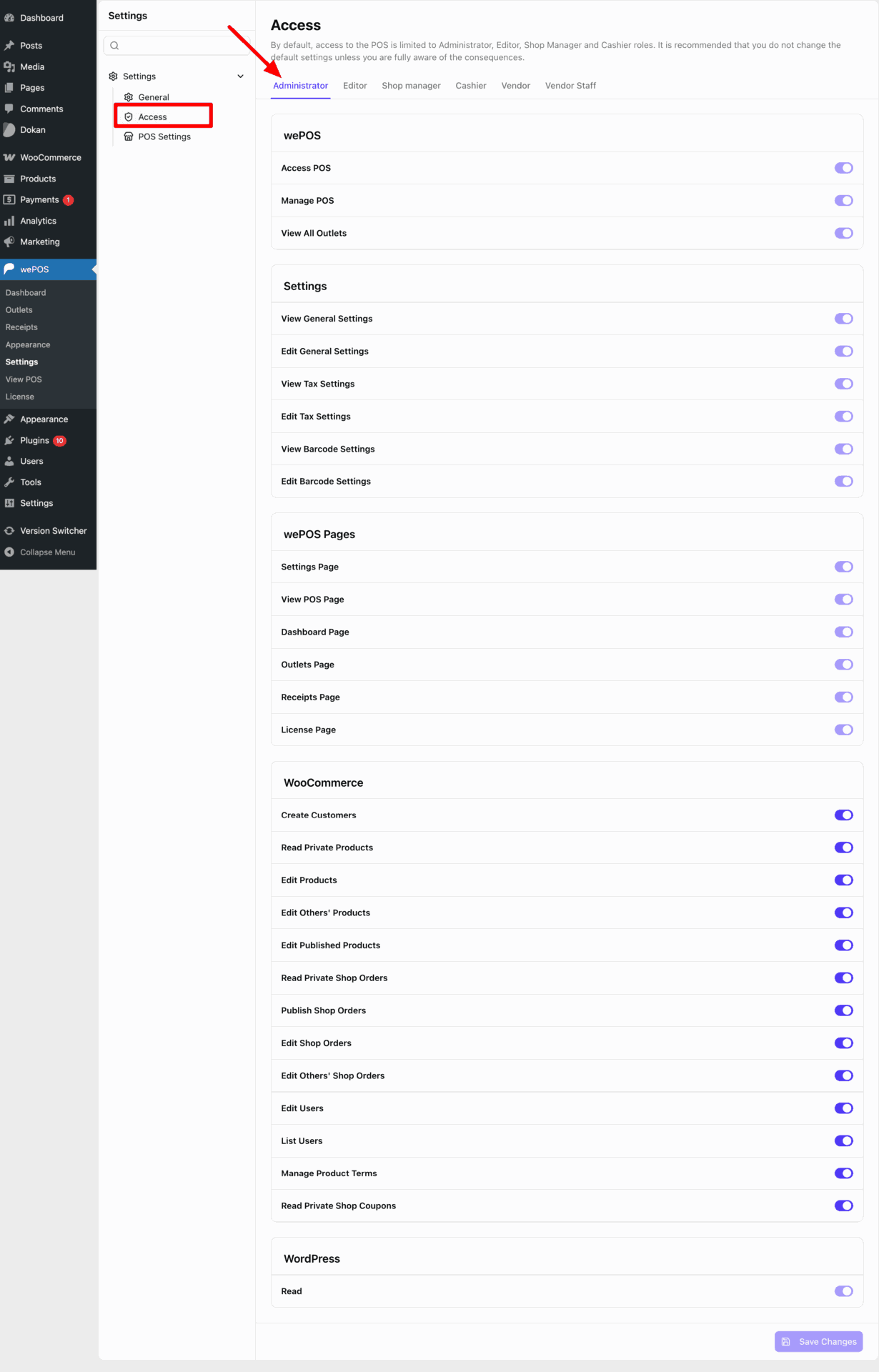
This section controls what an Administrator role can access and manage inside wePOS. Here’s a clean breakdown:
- Access POS: Allows the user to open and use the POS interface.
- Manage POS: Gives full control over POS operations, including managing outlets and configurations.
- View All Outlets: Lets the user view all available outlets in the system.
- View General Settings: Allows access to view general POS settings without making changes.
- Edit General Settings: Allows modifying general POS settings.
- View Tax Settings: Grants permission to view tax-related configurations.
- Edit Tax Settings: Allows editing tax configurations.
- View Barcode Settings: Allows access to view barcode scanner settings.
- Edit Barcode Settings: Allows modifying barcode-related settings.
- Settings Page: Grants access to the main settings page of wePOS.
- View POS Page: Allows access to the POS interface page.
- Dashboard Page: Grants access to the wePOS dashboard.
- Outlets Page: Allows access to manage and view outlets.
- Receipts Page: Grants access to receipt management.
- License Page: Allows access to license-related settings.
- Create Customers: Allows creating new customers directly from POS.
- Read Private Products: Grants access to view private products.
- Edit Products: Allows editing existing products.
- Edit Others’ Products: Allows editing products created by other users.
- Edit Published Products: Allows editing already published products.
- Read Private Shop Orders: Allows viewing private or restricted orders.
- Publish Shop Orders: Allows creating and publishing new orders.
- Edit Shop Orders: Allows editing existing orders.
- Edit Others’ Shop Orders: Allows editing orders created by other users.
- Edit Users: Allows modifying user accounts.
- List Users: Allows viewing all users in the system.
- Manage Product Terms: Allows managing product categories, tags, and attributes.
- Read Private Shop Coupons: Allows viewing private or restricted coupons.
- Read: Basic WordPress permission to access and view the dashboard.
Editor
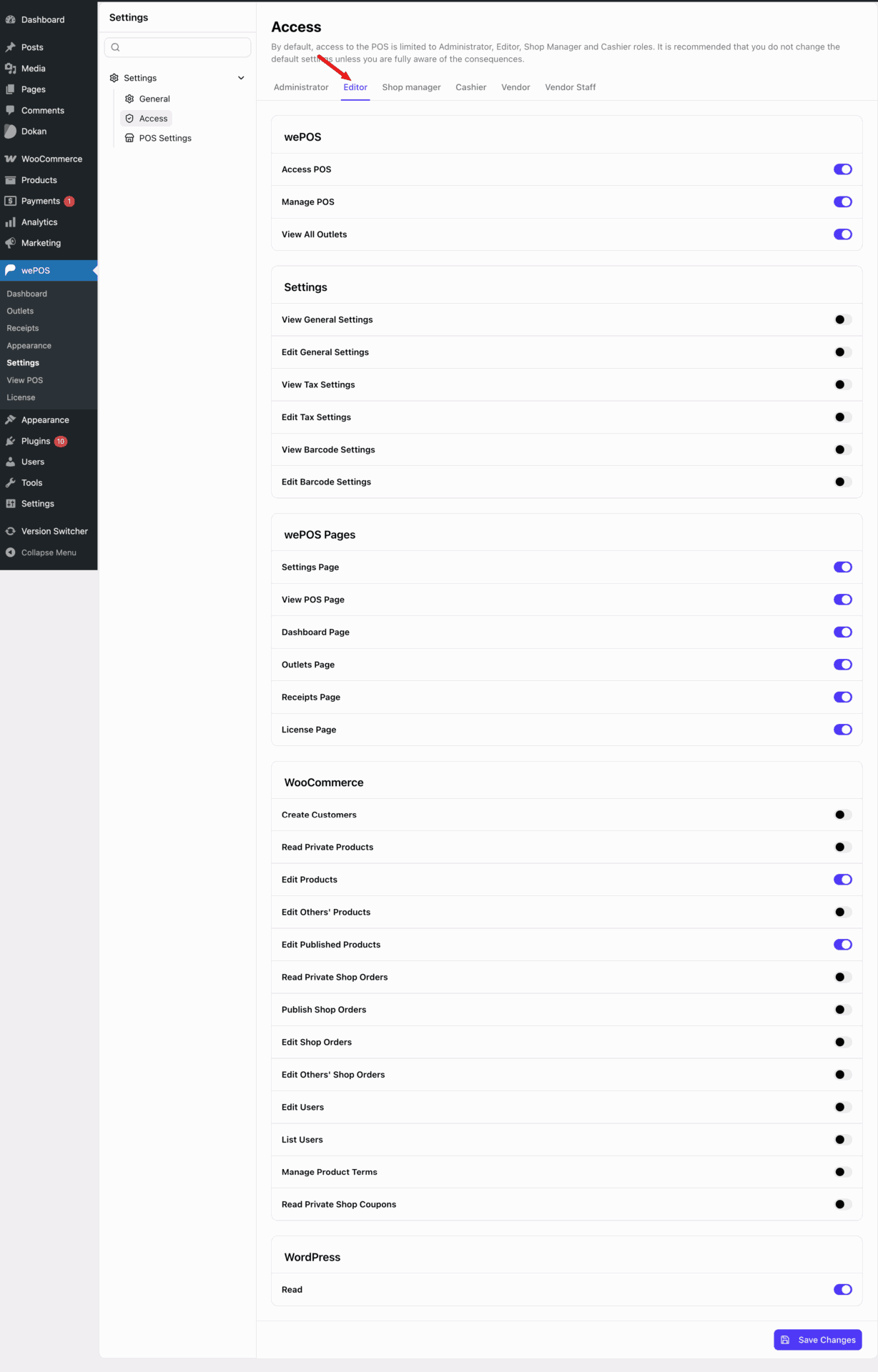
This section controls what an Editor role can access and manage inside wePOS. Here’s a clean breakdown:
- Access POS: Allows the user to open and use the POS interface.
- Manage POS: Gives control over POS operations based on enabled permissions.
- View All Outlets: Lets the user view available outlets in the system.
- View General Settings: Allows viewing general POS settings without editing access.
- Edit General Settings: Allows modifying general POS settings.
- View Tax Settings: Grants permission to view tax configurations.
- Edit Tax Settings: Allows editing tax configurations.
- View Barcode Settings: Allows viewing barcode scanner settings.
- Edit Barcode Settings: Allows modifying barcode settings.
- Settings Page: Grants access to the settings section of wePOS.
- View POS Page: Allows access to the POS interface page.
- Dashboard Page: Grants access to the wePOS dashboard.
- Outlets Page: Allows access to view and manage outlets.
- Receipts Page: Grants access to receipt management.
- License Page: Allows access to license settings.
- Create Customers: Allows creating new customers from POS.
- Read Private Products: Grants access to view private products.
- Edit Products: Allows editing existing products.
- Edit Others’ Products: Allows editing products created by other users.
- Edit Published Products: Allows editing published products.
- Read Private Shop Orders: Allows viewing private or restricted orders.
- Publish Shop Orders: Allows creating and publishing orders.
- Edit Shop Orders: Allows editing existing orders.
- Edit Others’ Shop Orders: Allows editing orders created by other users.
- Edit Users: Allows modifying user accounts.
- List Users: Allows viewing all users.
- Manage Product Terms: Allows managing product categories, tags, and attributes.
- Read Private Shop Coupons: Allows viewing private coupons.
- Read: Basic WordPress permission to access the dashboard.
Shop Manager
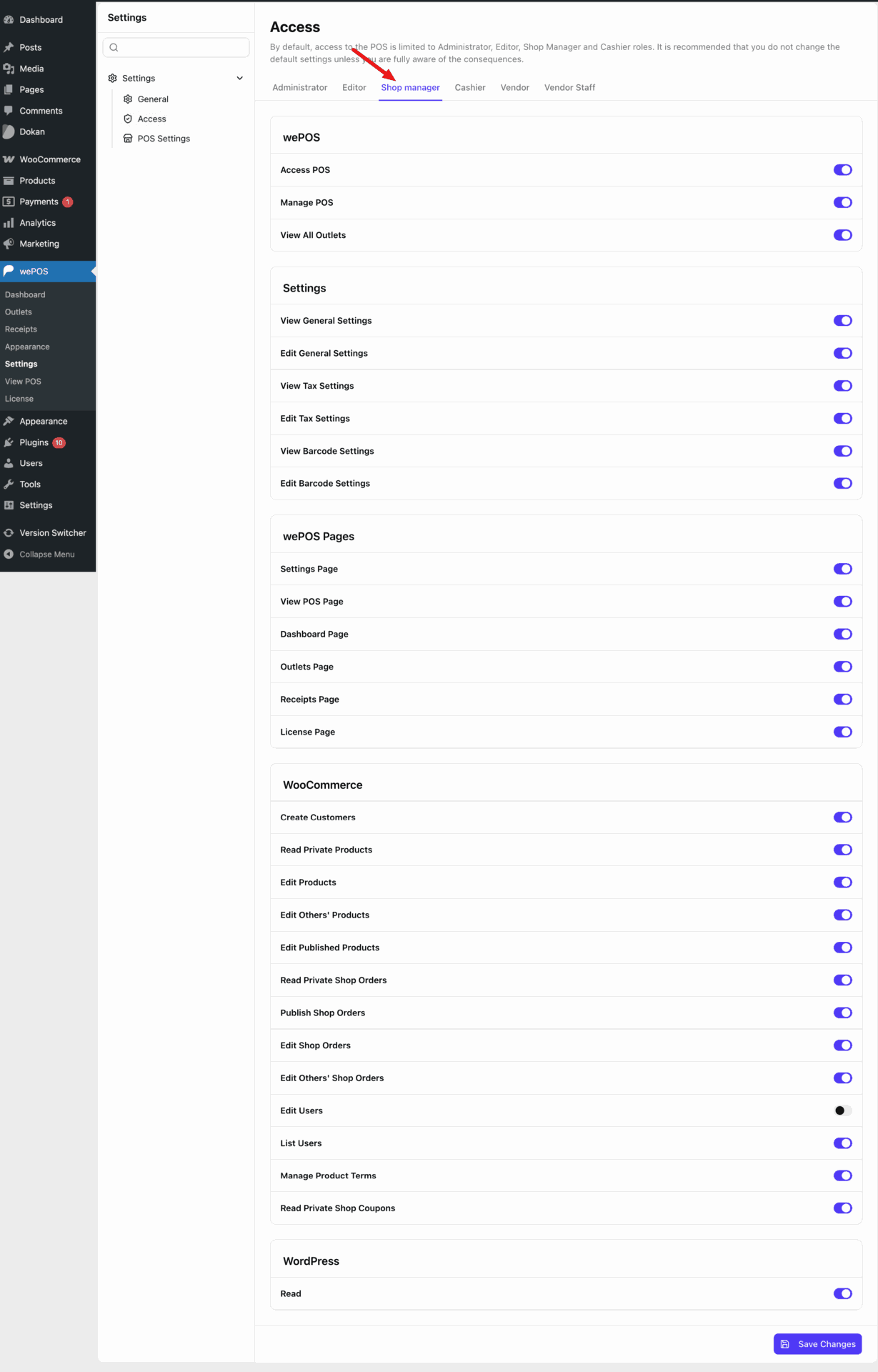
This section controls what a Shop Manager role can access and manage inside wePOS. Here’s a clean breakdown:
- Access POS: Allows the user to open and use the POS interface.
- Manage POS: Gives control over POS operations based on enabled permissions.
- View All Outlets: Lets the user view all available outlets in the system.
- View General Settings: Allows viewing general POS settings.
- Edit General Settings: Allows modifying general POS settings.
- View Tax Settings: Grants permission to view tax configurations.
- Edit Tax Settings: Allows editing tax configurations.
- View Barcode Settings: Allows viewing barcode scanner settings.
- Edit Barcode Settings: Allows modifying barcode settings.
- Settings Page: Grants access to the settings section of wePOS.
- View POS Page: Allows access to the POS interface page.
- Dashboard Page: Grants access to the wePOS dashboard.
- Outlets Page: Allows access to manage and view outlets.
- Receipts Page: Grants access to receipt management.
- License Page: Allows access to license settings.
- Create Customers: Allows creating new customers from POS.
- Read Private Products: Grants access to view private products.
- Edit Products: Allows editing existing products.
- Edit Others’ Products: Allows editing products created by other users.
- Edit Published Products: Allows editing published products.
- Read Private Shop Orders: Allows viewing private or restricted orders.
- Publish Shop Orders: Allows creating and publishing orders.
- Edit Shop Orders: Allows editing existing orders.
- Edit Others’ Shop Orders: Allows editing orders created by other users.
- Edit Users: Allows modifying user accounts.
- List Users: Allows viewing all users.
- Manage Product Terms: Allows managing product categories, tags, and attributes.
- Read Private Shop Coupons: Allows viewing private coupons.
- Read: Basic WordPress permission to access the dashboard.
Cashier
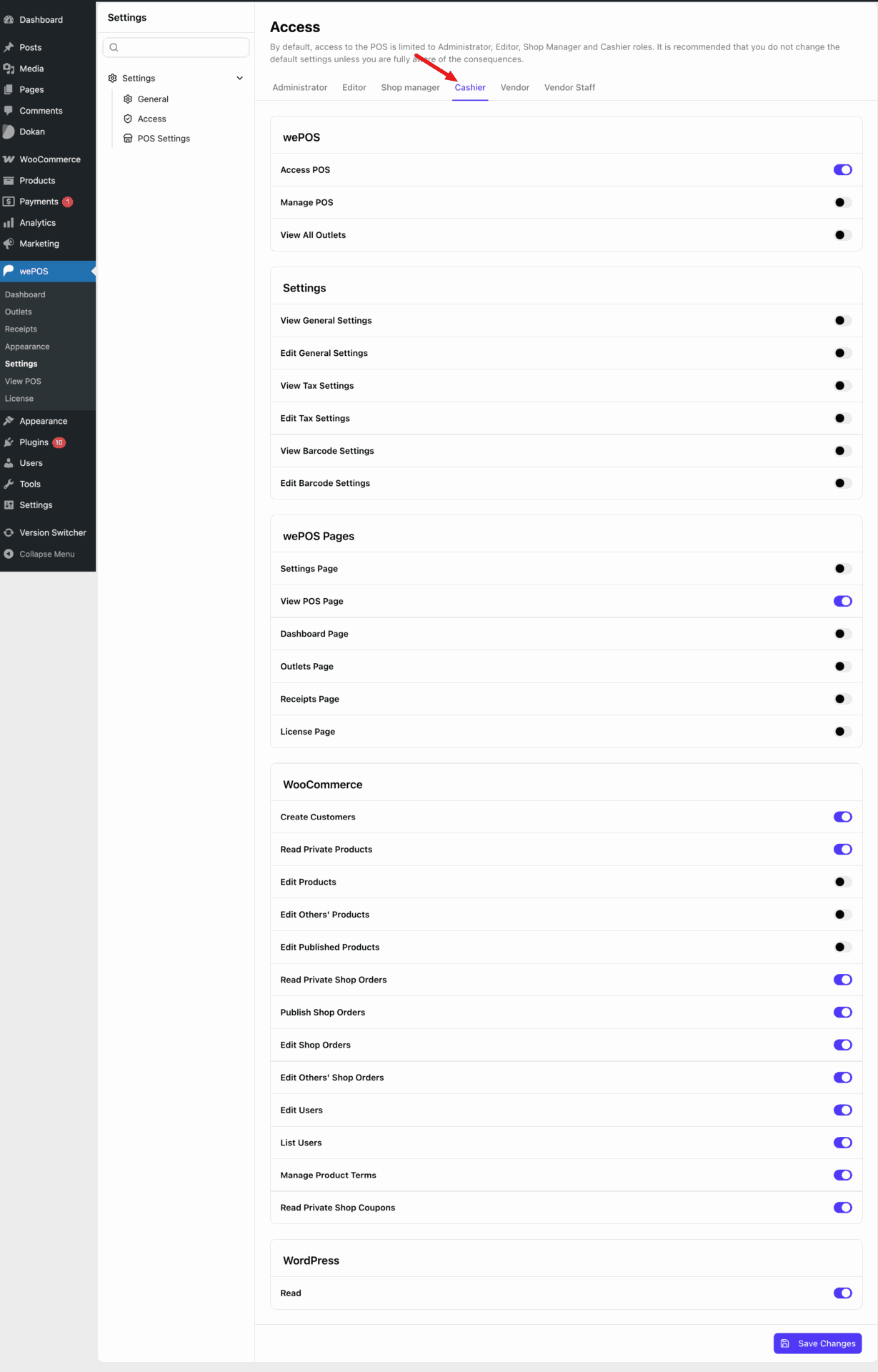
This section controls what a Cashier role can access and manage inside wePOS. Here’s a clean breakdown:
- Access POS: Allows the user to open and use the POS interface.
- Manage POS: Gives control over POS operations based on enabled permissions.
- View All Outlets: Lets the user view all available outlets in the system.
- View General Settings: Allows viewing general POS settings.
- Edit General Settings: Allows modifying general POS settings.
- View Tax Settings: Grants permission to view tax configurations.
- Edit Tax Settings: Allows editing tax configurations.
- View Barcode Settings: Allows viewing barcode scanner settings.
- Edit Barcode Settings: Allows modifying barcode settings.
- Settings Page: Grants access to the settings section of wePOS.
- View POS Page: Allows access to the POS interface page.
- Dashboard Page: Grants access to the wePOS dashboard.
- Outlets Page: Allows access to manage and view outlets.
- Receipts Page: Grants access to receipt management.
- License Page: Allows access to license settings.
- Create Customers: Allows creating new customers from POS.
- Read Private Products: Grants access to view private products.
- Edit Products: Allows editing existing products.
- Edit Others’ Products: Allows editing products created by other users.
- Edit Published Products: Allows editing published products.
- Read Private Shop Orders: Allows viewing private or restricted orders.
- Publish Shop Orders: Allows creating and publishing orders.
- Edit Shop Orders: Allows editing existing orders.
- Edit Others’ Shop Orders: Allows editing orders created by other users.
- Edit Users: Allows modifying user accounts.
- List Users: Allows viewing all users.
- Manage Product Terms: Allows managing product categories, tags, and attributes.
- Read Private Shop Coupons: Allows viewing private coupons.
- Read: Basic WordPress permission to access the dashboard.